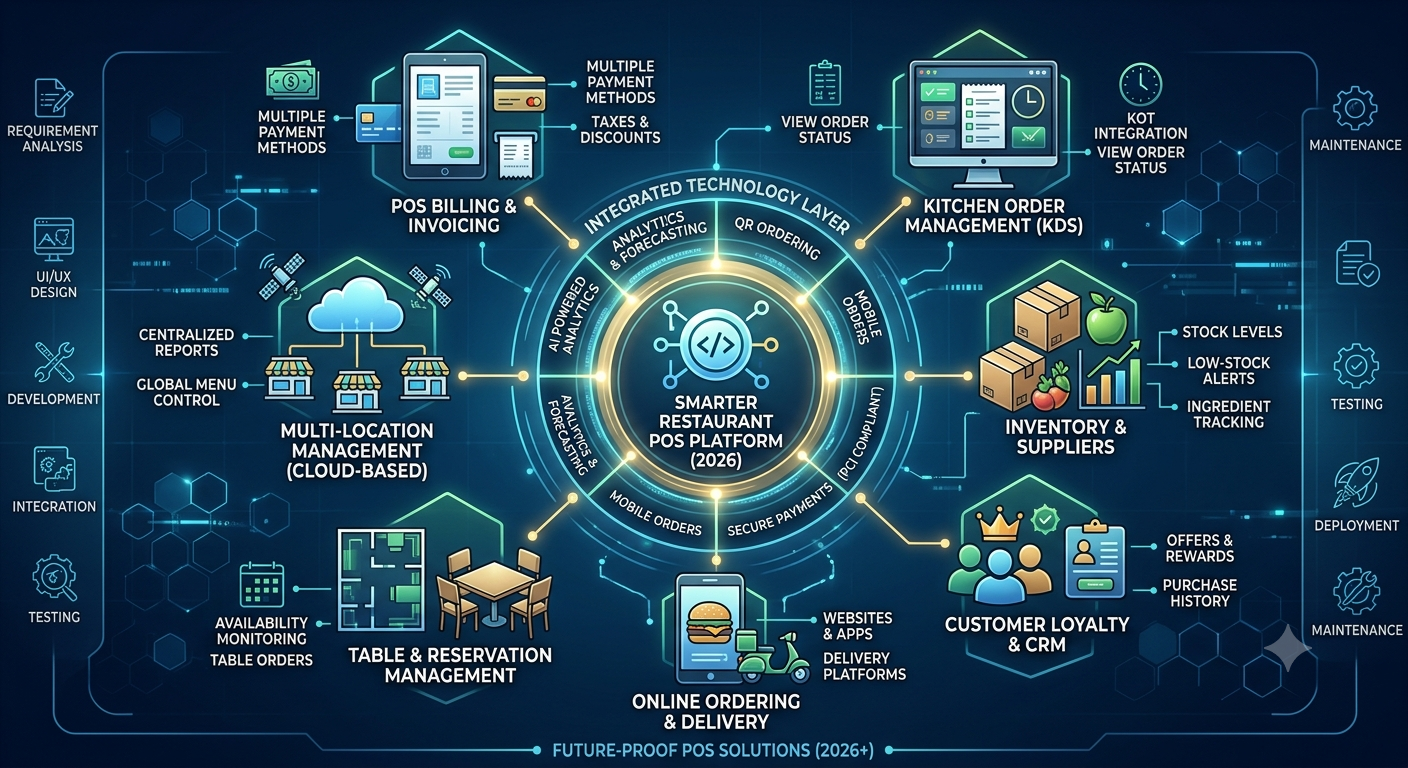
A modern restaurant needs more than a system that simply prints bills.
Restaurants, cafés, hotels, QSRs, cloud kitchens, bars, and retail businesses increasingly need technology that connects billing, orders, kitchen operations, inventory, payments, customer data, and analytics in one platform.
This is where custom POS software development can help businesses create a point-of-sale system around their actual workflows instead of forcing operations to adapt to a generic solution.
In 2026, businesses are also looking for POS platforms that support cloud operations, mobile ordering, QR ordering, real-time analytics, integrations, automation, and multi-location management.
What Is Custom POS Software Development?
Custom POS software development is the process of creating a point-of-sale platform specifically for a business’s operational and technical requirements.
Unlike an off-the-shelf POS system, a custom POS solution can be designed around:
- Restaurant workflows
- Billing requirements
- Kitchen operations
- Inventory management
- Customer loyalty
- Online ordering
- Payment integrations
- Employee roles
- Multi-location operations
- Business reporting
The objective is to create a connected system that helps businesses manage their day-to-day operations from a centralized platform.
Why Businesses Are Moving Toward Custom POS Systems
Generic POS platforms can provide essential billing functionality, but growing businesses often need additional capabilities.
A restaurant operating one location may have very different requirements from a restaurant chain managing multiple outlets.
A custom POS platform can be designed to support specific workflows while allowing businesses to add new features as their operations grow.
1. Business-Specific Workflows
Every business has different processes.
A custom POS can be designed around the way a restaurant manages tables, orders, discounts, kitchen tickets, inventory, payments, and reporting.
2. Better Integration
A POS system often needs to communicate with other business systems.
Custom POS development can support integrations with:
- Payment gateways
- Accounting software
- Inventory systems
- CRM platforms
- Delivery platforms
- Online ordering systems
- Kitchen display systems
- Loyalty platforms
- Customer communication tools
3. Scalability
Businesses may start with a single location and eventually expand to multiple outlets.
A scalable POS architecture can support additional stores, terminals, employees, menus, products, and customers without requiring the entire system to be replaced.
Essential Features of Custom POS Software
A modern POS platform can combine several operational features into one solution.
POS Billing and Invoicing
The billing module is at the center of most POS platforms.
Businesses can manage:
- Product or menu selection
- Discounts
- Taxes
- Multiple payment methods
- Receipts
- Refunds
- Order modifications
- Invoice generation
The interface should be fast and easy for staff to use during busy operating hours.
Kitchen Order Management
For restaurants, the POS should connect front-of-house ordering with kitchen operations.
A Kitchen Display System (KDS) can help kitchen staff view incoming orders, organize preparation, and track order status.
This can reduce dependence on printed kitchen tickets and improve communication between servers and kitchen teams.
Table Management
Restaurant POS software can include visual table management to help staff monitor:
- Available tables
- Occupied tables
- Reserved tables
- Table orders
- Split bills
- Table transfers
This is particularly useful for restaurants with dine-in operations.
Inventory Management
Inventory management is another important component of restaurant POS software.
The system can help businesses monitor:
- Stock levels
- Ingredients
- Product usage
- Purchase orders
- Suppliers
- Wastage
- Low-stock items
For restaurants, inventory can also be connected with recipes and menu items to provide better visibility into ingredient consumption.
QR Code Ordering
QR ordering allows customers to scan a code and access a digital menu.
Depending on the implementation, customers can:
- Scan a QR code.
- Browse the menu.
- Select products.
- Submit the order.
- Make a payment.
- Receive order confirmation.
Orders can then be routed to the appropriate restaurant workflow.
Online Ordering
A custom POS can connect in-store and online orders through a centralized system.
This can help businesses manage orders from websites, mobile applications, and other supported sales channels.
Customer Management
A POS platform can maintain customer information and transaction history where appropriate.
Businesses can use this information to support:
- Loyalty programs
- Customer rewards
- Offers
- Purchase history
- Personalized promotions
Employee Management
Custom POS systems can include role-based access for different employees.
For example:
- Cashier
- Waiter
- Manager
- Kitchen staff
- Store administrator
- Business owner
Each role can have appropriate permissions.
Cloud-Based POS Software
Cloud POS systems allow businesses to access centralized data and management tools through internet-connected devices.
For multi-location businesses, cloud architecture can help centralize:
- Sales information
- Inventory
- Menus
- Employee information
- Reports
- Product data
Business owners can monitor operations without being physically present at every location.
However, cloud architecture should also be designed with appropriate security, availability, access controls, and backup strategies.
AI in POS Software
Artificial intelligence is becoming increasingly relevant to POS and restaurant management systems.
AI-powered POS features can support areas such as:
Sales Forecasting
Historical sales data can be analyzed to identify patterns and support demand planning.
Inventory Insights
Analytics can help businesses identify frequently used products, slow-moving inventory, and potential stock requirements.
Personalized Recommendations
Customer purchase patterns can potentially be used to create more relevant offers and recommendations.
Automated Reporting
AI-assisted analytics can help convert large volumes of sales information into easier-to-understand business insights.
AI should complement the POS workflow rather than make the system unnecessarily complicated for employees.
Custom POS for Different Industries
Custom POS software isn’t limited to restaurants.
Restaurants
Features can include:
- Table management
- KOT
- KDS
- Menu management
- Online ordering
- QR ordering
- Inventory
Cafés
Cafés can benefit from:
- Fast billing
- Product modifiers
- Loyalty programs
- Digital menus
- Customer management
- Inventory tracking
Hotels
Hotel POS systems can integrate restaurant billing with broader hospitality workflows.
QSRs
Quick-service restaurants require fast ordering and payment processing, making streamlined POS interfaces particularly important.
Cloud Kitchens
Cloud kitchens can use POS systems to centralize orders from multiple digital channels.
Retail Stores
Retail POS software can include:
- Product management
- Barcode scanning
- Inventory
- Discounts
- Customer accounts
- Sales analytics
Custom POS vs. Off-the-Shelf POS
The right choice depends on business requirements.
| Requirement | Custom POS | Off-the-Shelf POS |
|---|---|---|
| Business-specific workflows | Highly customizable | Usually limited |
| Custom integrations | Flexible | Depends on provider |
| UI customization | High | Usually limited |
| Scalability | Can be designed around business growth | Depends on platform |
| Feature development | Business-specific | Provider roadmap |
| Initial development | Requires development investment | Usually faster to deploy |
| Ownership and control | Greater control possible | Provider-dependent |
Businesses should evaluate their operational requirements, budget, integration needs, security requirements, and long-term growth plans before selecting an approach.
How Custom POS Software Development Works
A typical custom POS development process includes several stages.
Step 1: Requirement Analysis
The development team identifies business workflows, users, integrations, hardware requirements, and reporting needs.
Step 2: UI/UX Design
POS interfaces should be designed for speed and simplicity because employees often use them during busy periods.
Step 3: Architecture Planning
The technology architecture is planned around scalability, security, integrations, database requirements, and deployment.
Step 4: Development
Developers build the POS modules, APIs, dashboards, integrations, and required backend services.
Step 5: Integration
The system can be integrated with payment providers, accounting platforms, delivery systems, KDS, inventory systems, and other required services.
Step 6: Testing
The platform should undergo functional, performance, security, integration, and usability testing.
Step 7: Deployment
The completed POS solution can be deployed to the required cloud or on-premise environment.
Step 8: Maintenance
Ongoing updates, monitoring, bug fixes, security improvements, and feature enhancements help keep the platform reliable.
Security Considerations for POS Software
POS platforms process important business and transaction information, so security should be part of the architecture from the beginning.
Important considerations can include:
- Role-based access control
- Secure authentication
- Encryption
- API security
- Secure payment integrations
- Logging and monitoring
- Regular vulnerability management
- Secure software updates
- Data backup
- Access management
Payment-related environments may also have specific compliance obligations depending on their architecture and role in payment processing.
How Much Does Custom POS Software Development Cost?
The cost of developing custom POS software depends on the project’s scope.
Factors include:
- Number of platforms
- Number of POS terminals
- Required features
- UI/UX complexity
- Payment integrations
- Third-party integrations
- Cloud infrastructure
- Admin dashboard
- Multi-location support
- Inventory requirements
- KDS requirements
- Mobile applications
- Security requirements
- Ongoing maintenance
A basic POS application and an enterprise restaurant management platform can therefore have very different development costs.
Instead of selecting a development budget based only on the number of features, businesses should first define the workflows and integrations that are essential to their operations.
Why Choose CustomPOS for POS Software Development?
CustomPOS focuses on developing POS solutions around business-specific requirements.
A custom POS platform can be designed for:
- Restaurants
- Cafés
- Hotels
- QSRs
- Cloud kitchens
- Retail stores
- Restaurant chains
- Multi-location businesses
Development can include POS billing, inventory management, KOT/KDS, table management, QR ordering, online ordering, payment integrations, customer management, analytics, and multi-location functionality.
The goal is to create a centralized platform that connects daily operations while providing businesses with the flexibility to expand their technology as they grow.
Final Thoughts
A modern POS system is no longer simply a digital cash register.
Businesses increasingly need a connected platform that brings together billing, payments, inventory, kitchen operations, customer management, online ordering, analytics, and business administration.
For restaurants, hotels, QSRs, cafés, cloud kitchens, and retail businesses with specialized requirements, custom POS software development can provide the flexibility needed to build workflows around the business rather than around a fixed software package.
Whether the goal is to launch a new restaurant POS platform or modernize an existing system, starting with clear business requirements, scalable architecture, secure integrations, and a simple user experience can create a strong foundation for long-term growth.
Frequently Asked Questions
What is custom POS software?
Custom POS software is a point-of-sale system developed specifically around the workflows, features, integrations, and operational requirements of a particular business.
What features should a restaurant POS system have?
Important features can include billing, KOT, KDS, table management, inventory, menu management, QR ordering, online ordering, payment integration, customer management, and analytics.
Can custom POS software support multiple locations?
Yes. A POS platform can be architected to support multiple stores, centralized administration, location-level reporting, inventory management, and other multi-location requirements.
Can POS software integrate with payment gateways?
Yes. Custom POS applications can integrate with suitable payment gateways and payment services based on business and technical requirements.
Can AI be integrated into POS software?
Yes. AI can be incorporated into areas such as sales analytics, forecasting, recommendations, reporting, and operational insights.
How long does it take to develop custom POS software?
Development time depends on the platform’s features, integrations, number of interfaces, hardware requirements, and overall complexity. A detailed requirements analysis is generally needed before providing a reliable timeline.
Comments